Cadence runs your show's time — NTP-accurate clocks, countdowns, and the run of show —
puts live audience polls on screen, and fans the exact same picture to your display, the web, NDI,
SDI, vMix, wall clocks, and any producer's phone. One engine, every output, on one disciplined clock.
NTP-disciplined·Built for remote production·Display · Web · NDI® · Blackmagic DeckLink SDI · vMix · Cloud · Wall clocks
The real output picture, recorded live from Cadence.
Built for
Houses of worship
A sermon or message timer that follows ProPresenter, right on the stage monitor.
Corporate events
Session countdowns a speaker can see from the podium, and live audience polls on the big screen.
Live concerts
Set-length and show clocks over NDI or SDI, in sync with FOH and lighting.
Broadcast
Frame-tight time-of-day and segment timers, fanned to SDI and NDI at once.
Studios
One master clock across every studio's output — display, web, SDI, and the cloud.
Remote production
Direct or produce a show from anywhere — no truck on-site, no VPN, over a shareable link.
One engine, every output
Drive it once. Show it everywhere — in sync.
A single disciplined time source answers "what time is it right now" for every output, so nothing
drifts. Build the look once; wire it to as many outputs as your show needs. Video outputs render on
the GPU at 59.94 fps, in 720p, 1080p or 4K UHD.
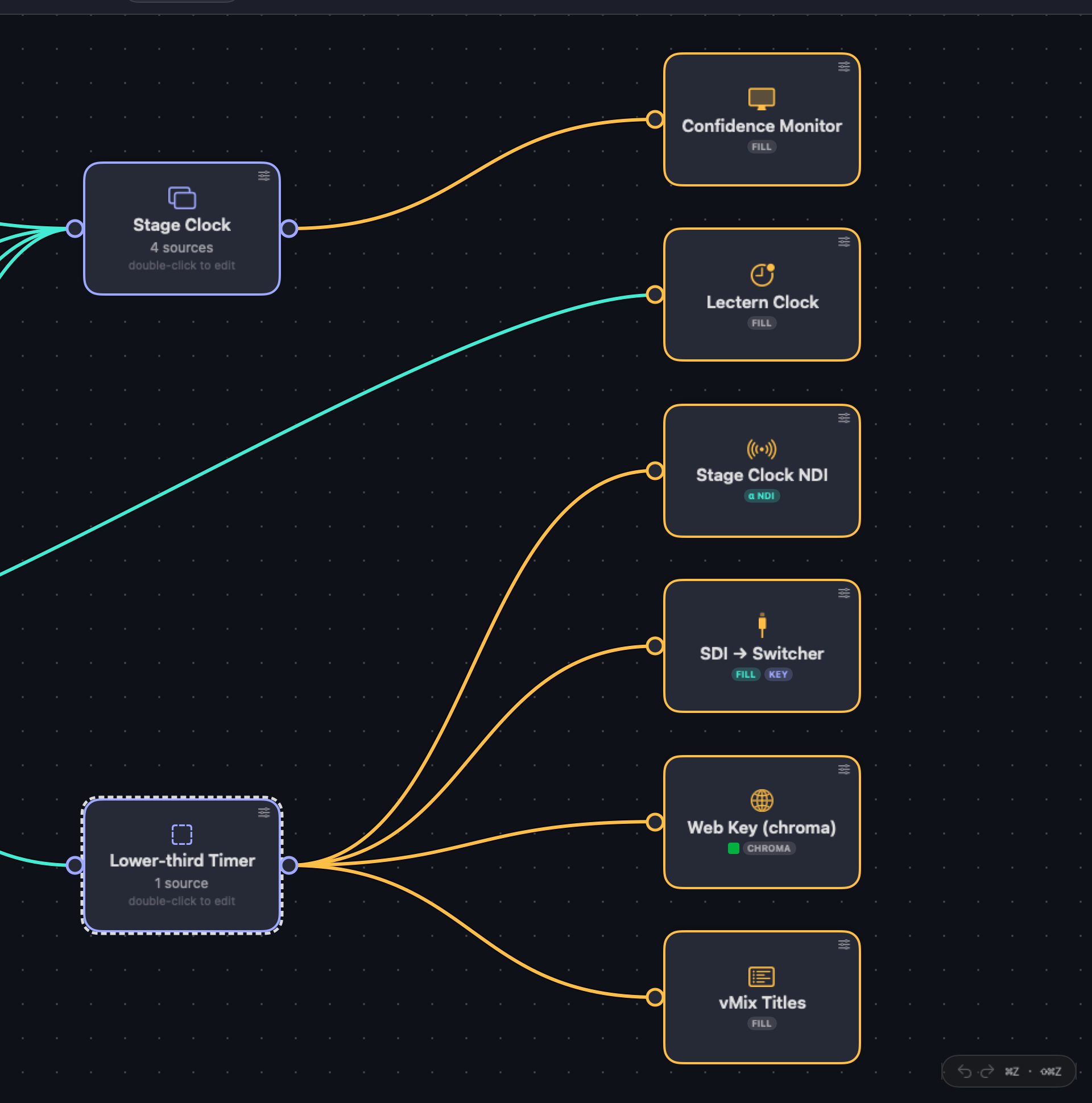
The real editor: two designs wired to six outputs at once (display, a TimeMachines lectern clock, NDI, SDI fill + key, a web key and vMix titles). Demo show.
The actual output picture, the same frames a display, NDI or SDI receives: time of day and a running countdown, recorded in real time.A transparent lower-third timer, keyed over a sample background (generated for the demo).
Accuracy
A broadcast clock is only as good as the time behind it.
Cadence runs a software-disciplined clock: it corrects the Mac against internet time and keeps
correcting all show long, so every output — display, web, NDI, SDI, cloud, and wall clocks — reads
the same time. The status line shows how close the clock is to the time server, and says so plainly the moment it isn't locked.
Disciplined continuously
Queries NTP in a short burst and trusts the lowest-jitter sample, then re-syncs throughout the show — not just once at launch — so it never drifts over a long day.
Corrections you'll never see
Small corrections (under 100 ms) ease in gradually instead of jumping, so a live countdown doesn't visibly skip or tick backward mid-show. Only a big error, like the very first lock, is corrected at once.
Compensates for your Mac's drift
Every machine's clock crystal runs slightly fast or slow. Cadence measures that drift and corrects for it between syncs, so the time stays true in the gaps — not only at the instant it checks.
Honest, never faked
The status line shows the live offset, and the learned drift once it settles. If it can't reach a time server it says so plainly and falls back to the system clock — it never pretends to be locked.
Sources
Every kind of clock — and it follows your gear.
Time of day, timers, timecode, or a live feed from the tools already running your show. Each source
is a node you wire into a layout — and a Priority tile lets several clocks share one spot,
showing the most important one that's running (the time of day, until a countdown starts).
Time of day
Analog or digital faces, disciplined to NTP so a broadcast clock never surprises you — sub-frame accurate, and it says so when it isn't locked.
Countdown, count-up & count-till
A duration timer, an open count-up, or a clock counting to a fixed time of day — green → amber → red warning thresholds, run-over past zero with its own colour, and Time Shift to slow a timer down (to a stop) or speed it up to 2× when the show runs early or late.
Timecode (LTC in)
Decode linear timecode off any audio input — auto frame-rate — and drive a clock straight from the house TC.
External clocks
Mirror the live timer from the systems already running the show — each with a connection-status dot.
Follow ProPresenter's video-countdown for a sermon or message timer that stays in sync with slides — a natural fit for a house of worship running its service off ProPresenter.
Rundown StudioProPresenterQLabPlaybackProHyperDeckATEMvMixPlanning Center
Messages & slates
Push a title, a hold slate, or a timed message to the same outputs as your clocks — show it steady or flashing, with an optional pulsing dot so the presenter knows the feed is live.
Follow the rundown
Point Cadence at a Rundown Studio show and it tracks the active cue's remaining time, advancing automatically when the operator hits next.
Warning colours in real time: amber at 10 seconds, red at 5, then the timer runs over past zero in its own colour.
Audience polls
Ask the room. Put the answer on screen.
The audience votes from their phones — scan a QR code or type a short link, no app to install.
Results build live on every output Cadence drives, styled like the rest of your show.
Multiple choice or typed answers. Give people options to pick from (one, or several up to a limit you set), or let them type their own answer.
Typed answers stay clean. "Pizza" and "pizza!" count as the same answer, swearing is kept off the screen, and you can hide any answer with one click.
Bars, donuts, leaderboards, word & bubble clouds. 18 ready-made presets, or split the graphic into separate elements and lay them out yourself.
One link per show. A named link like poll.livelogix.app/keynote follows whatever poll is live — print the QR once.
Your brand on their phone. Event name, logo, colours, font and background, designed in a live preview.
Rehearse without an audience. Simulate votes to check the look; a real vote always wins.
Keep the results. Every question is logged as it closes — export a CSV for Excel.
A results page for the producer. Every answer, live, on your network or in the cloud — pick one to Show on screen as a Selected answer, or clear it. Share a view-only link, or a separate one that can control it.
Names, if you want them. Ask for — or require — a name on any question; names show on the results page and in the report.
Surveys. A multi-question form people fill in before the show; close it at the start and put the results up during it.
A Poll Control window. Every poll in its own tab, in a big window for editing questions and running the vote.
The real poll graphic, recorded live from Cadence with sample votes (its Simulate votes feature), ending in the reveal.
An open question as a bubble cloud, recorded live from Cadence: typed answers grow as they arrive, and the same word typed differently merges into one bubble. The answers are sample data.
Show Schedule & Run of Show
Your spreadsheet is the rundown.
Load the schedule you already have, and Cadence runs it — cue by cue, timers set from each row,
with a live view of whether the show is ahead or behind.
A live Google Sheet
Paste a share link and Cadence keeps pulling it — edits in the sheet show up in the show, without touching the cue that's running or the one on deck.
Any layout, Excel or CSV
Finds the header row in a messy sheet, picks the tab in a multi-sheet .xlsx, and lets you map columns — In/Out or Duration, plus your own custom fields.
Ahead, behind, and when we'll finish
Schedule status and a projected end time, updated live — and Time Shift to win back lost minutes.
Run of Show on screen
A rundown element for any design — previous and next cues around the live one — on a display, NDI, SDI, or a web page viewers can customise.
Session and speaker timers
Point different timers at different duration columns — one for the session, one for the speaker — each set automatically as the cue changes.
Run it from the producer page
Set & Start, jump to a cue by number, auto-advance on or off, even upload a replacement sheet mid-show.
Planning Center Services LIVE
Your service plan, on every screen.
Sign in with Planning Center and pick a service type. Cadence follows whichever service goes live in
Services LIVE — the current item counting down, what's next, and whether the service is running long —
with nothing to set up each week.
The current item, counting down
Time left in the item LIVE is on — amber near the end, then red and counting on as + when it runs over.
Current and next on screen
Tie text boxes to the live item and the one after it, for a stage display or a lower third.
Timers follow LIVE
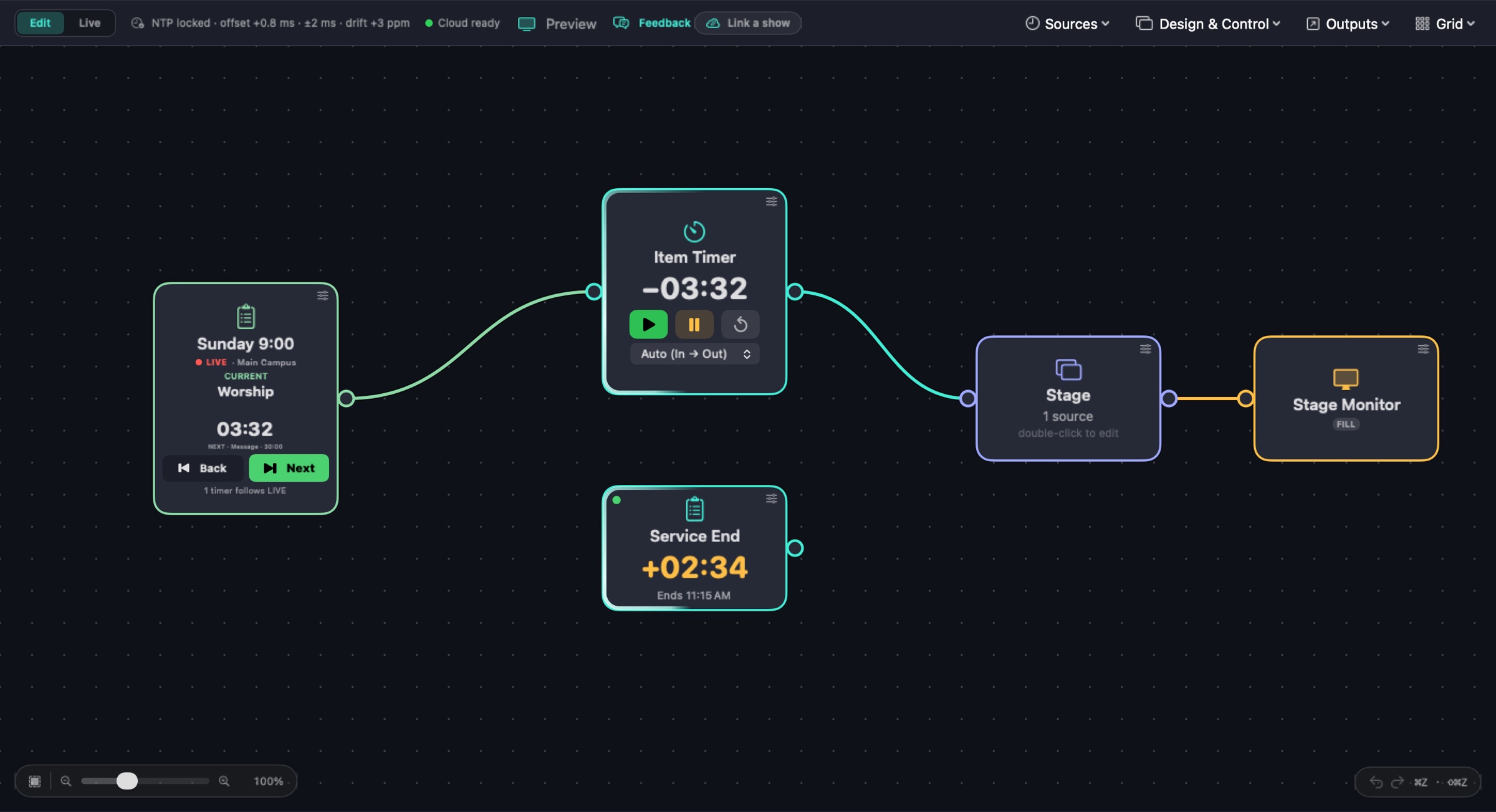
Wired timers run with each item to its real end in Services LIVE, overrun included, and stay in step with it.
Ahead or behind
A Service end clock projects when you'll finish and shows how far ahead (−) or behind (+) the service is running.
Drive LIVE from Cadence
Take control, then step Back and Next from the schedule tile — it says where LIVE is going until it gets there.
Every campus
One schedule per service type — Main Campus, Youth — each following its own live service.
Cadence — Sunday 9:00
The real editor: the Planning Center schedule tile drives the item timer, and a Service end clock shows the service running 2:34 late. Demo show: the Services LIVE state is simulated. More about Planning Center →
Inside Cadence
Wired like a patch bay. Read like a rundown.
Sources on the left, a design in the middle, outputs on the right — wire a cable, and that's live.
Every node shows its own status, so you always know what's connected and what isn't.
Cadence — Demo Show.cadence
The real Cadence editor, live, running a demo show: sources and clocks wire into a Design, and each Design fans out to as many Outputs as the show needs. Timecode and the ProPresenter walk-in are simulated for the demo.
Design & Control
Flexible by design.
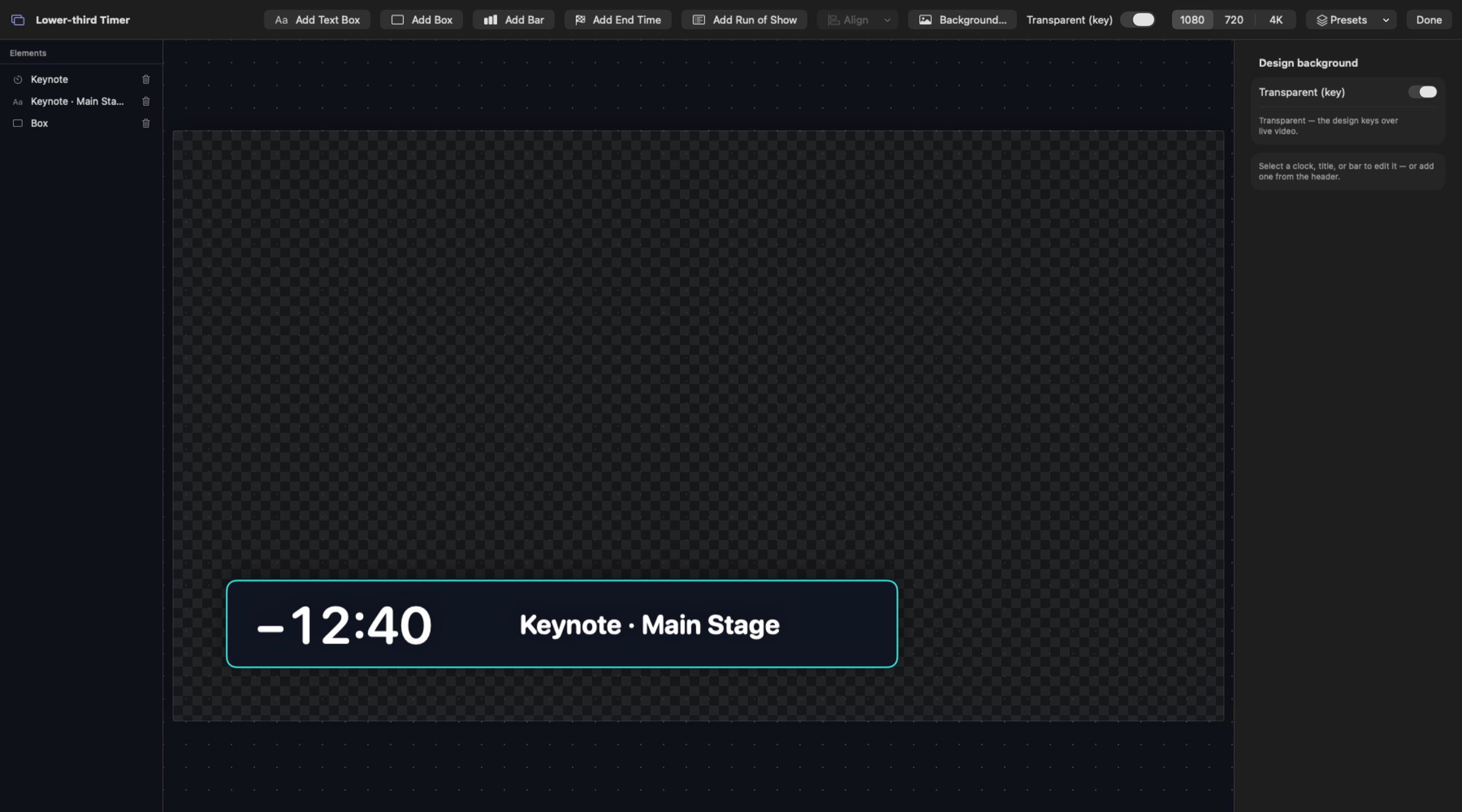
The Designer lays out how a show looks — position, size, font, and
colour, independently, per element. Any installed font, layers you can arrange, and design presets
you save once and recall onto any design.
Design — Lower-third Timer
The real Designer: Elements on the left, the artboard in the middle, the inspector on the right. Here, a transparent (keyed) lower-third timer from a demo show.
Remote production
The engine stays at the venue. Your team doesn't have to.
Cadence runs on the Mac next to the gear — driving the display, NDI, and SDI outputs locally,
frame-tight, with no dependency on the internet. Timing and
direction can happen from anywhere: a producer, a director, or a whole remote truck can start,
stop, and adjust the show's clocks over a link, as if they were in the room.
No truck required on-site. One operator and a Mac at the venue; the production team calls the show remotely.
Attach by code, not a VPN. The app mints a link over an outbound connection — no port-forwarding, no on-site IT.
View or control, scoped per source, per person — the Mac at the venue stays the one source of truth.
Feels local. The remote panel syncs to the venue's disciplined clock and ticks smoothly between updates.
Never guesses. Explicit connection status — live, reconnecting, or venue-offline — so a remote director never calls a cue off a frozen countdown.
No internet? Still works in the room. Producer pages open over the venue network, a direct cable, or Thunderbolt Bridge — and phones get their own designed layout.
The real Producer page on a phone, live: start the Keynote, add a minute, pause and resume the Speaker, then Set & Start a Q&A preset.
The same page on a laptop, laid out in the page editor. Every tap goes through Cadence's real command path; the show is a demo.
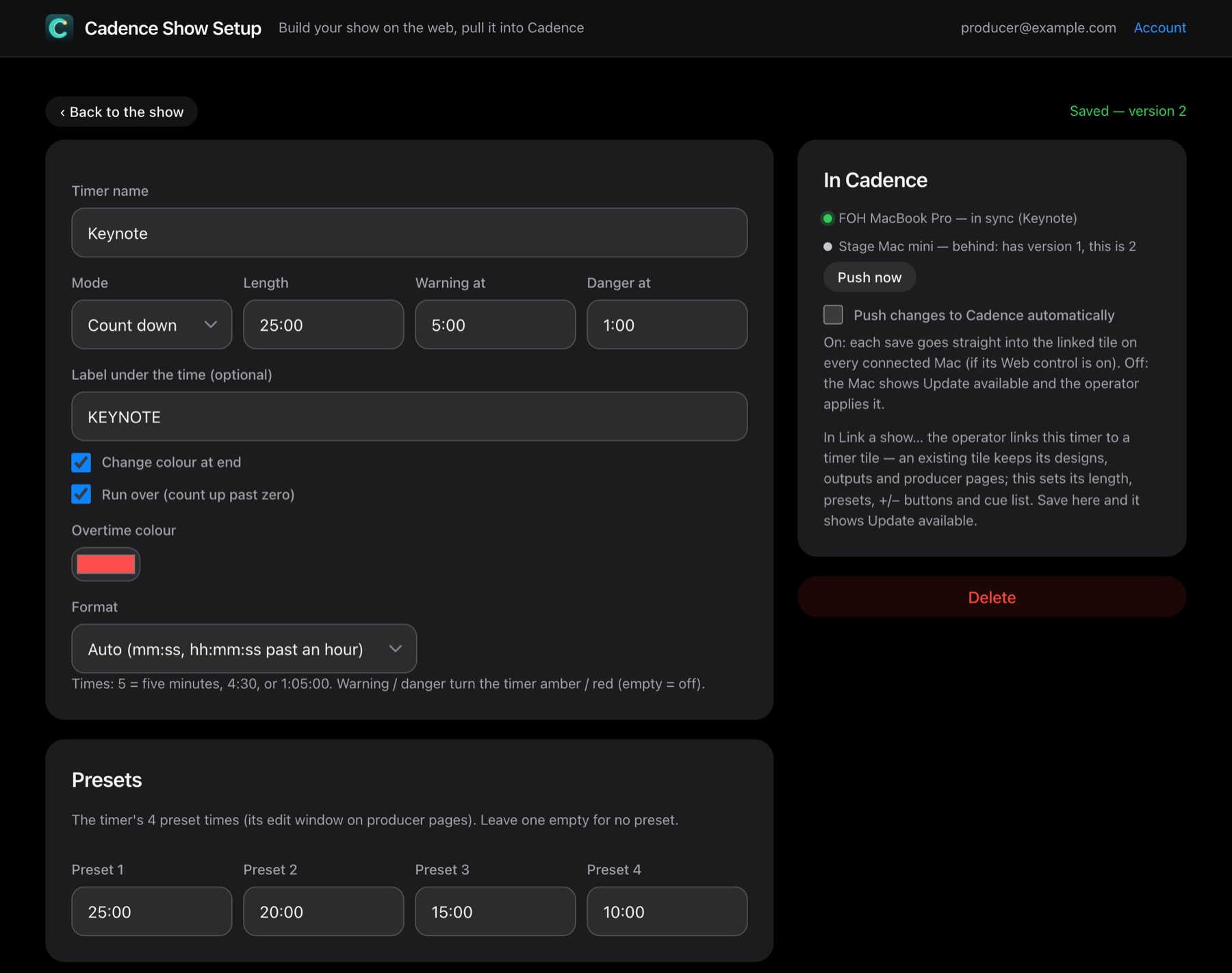
Cadence Show Setup
Prep the show in a browser. Run it on the Mac.
Producers build a show's polls, timers and schedules on the web — from anywhere, before anyone is
on site — then hand it to the operator with a code. Free with a LiveLogix login.
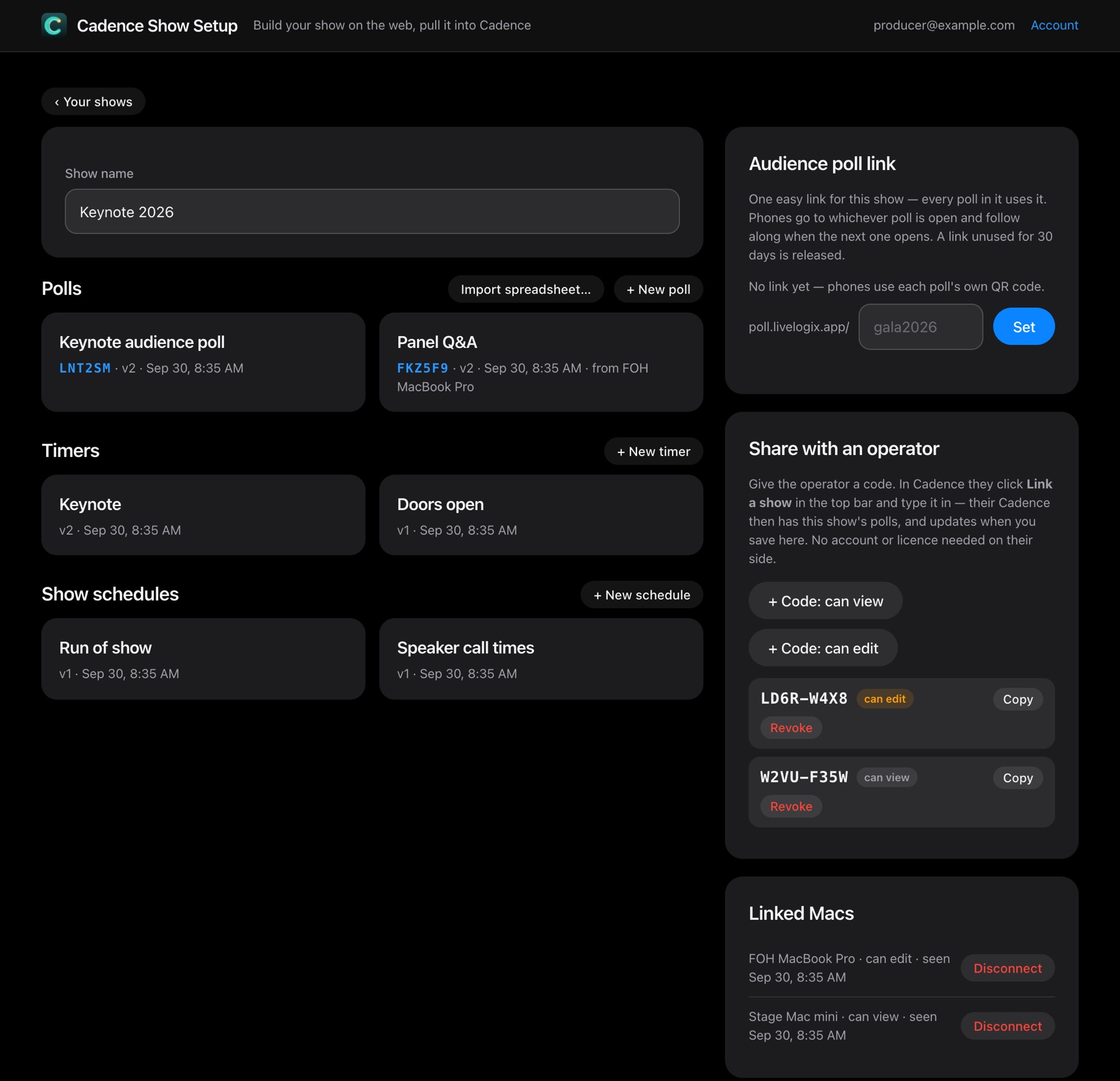
Build it all on the web. Poll questions, timers with every option, and schedules from a CSV, an Excel file, or a live Google Sheet.
Share with a code. An 8-character code gives an operator view or edit access — no account needed on their side, and you can revoke it any time.
Links into the show. Cadence links each item to a tile — a new one, or take over an existing tile and keep its wiring.
Always know who's current. Each linked Mac reports in sync or behind; push changes by hand or automatically on save.
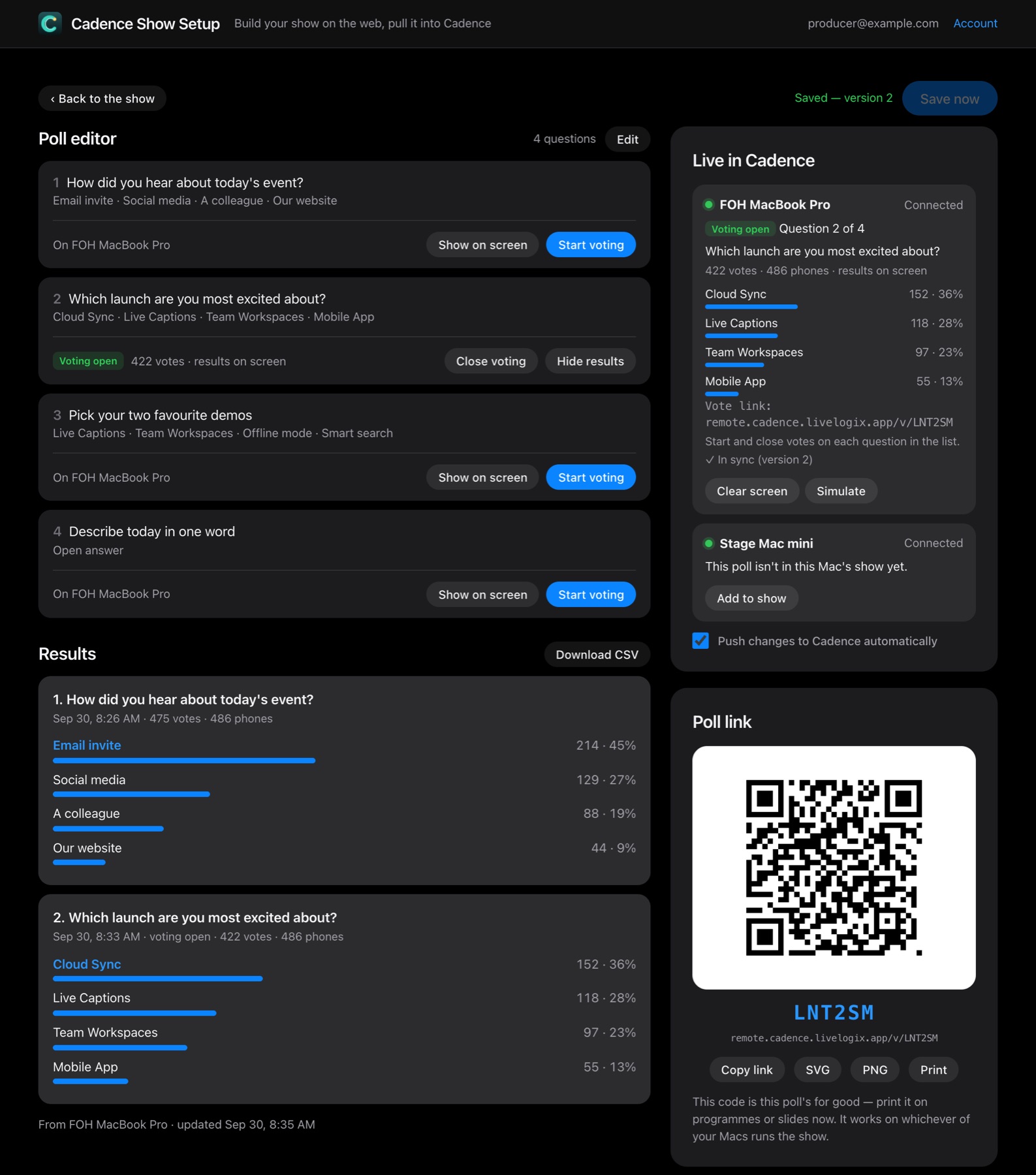
Run polls from the page. Open and close voting, move between questions, and watch results come back live, with a CSV export.
The real Show Setup page with a demo show: polls, timers and schedules, operator share codes, and the Macs linked to it.
A timer on the web, and who's current: one Mac in sync, one behind with Push now. The Macs are simulated for the demo.Running a poll from the page: open and close voting, move between questions, live results and CSV export. Votes are sample data.
Show operations
Built for running a real show.
Everything between "load the schedule" and "we're clear" — laid out as a node graph you can read at a glance.
Node-graph editor
Wire sources → designs → outputs, Plugboard-style. New line, no new learning.
Layout designer
Place and size clocks, polls, rundowns, text, boxes and bars — any font, layers, and saved design presets.
Cue Stack
Queue up to 50 times per timer on the producer page — Set, or Set & Start, in one tap.
Time editor
Change a running timer by duration or end time, absolute or relative — type it loosely, with undo.
Mobile producer layout
Design a separate phone layout — phones load it automatically, on the LAN or the cloud.
Stream Deck via Companion
A Bitfocus Companion module for timers, presets, schedules, cue stacks, polls, messages and cue lights — with live tally.
Cue light & On Air
A GO / warning / stop lamp driven by your timers, and iTach relays for a real On Air sign.
Scheduled automation
Arm a timer to fire at a wall-clock moment — once, or every day — for hands-free segment starts.
Presets
Recall a whole look and timer set with one tap.
Save & load shows
A whole show — clocks, designs, outputs — in one document.
Preview monitor
Confidence-monitor any output in a window before it goes live.
Restore after a relaunch
Quit mid-show by accident? Cadence offers to put the running timers back exactly where they were.
Native macOS. One engine to your display, the web, NDI, SDI, vMix, the cloud, and the wall — and the audience's phones.
Free beta · everything unlocked · 2 months
Get your beta key
One key per email: it unlocks every feature, including the cloud, on up to 2 Macs for 2 months.
Already signed up? Enter the same email and we'll re-send your key. System requirements: macOS 15 Sequoia or later, Apple silicon or Intel. SDI needs a Blackmagic DeckLink card with Desktop Video; NDI is built in.