Cadence / Synced show clocks
Clock sync · NTP · macOS

Every screen, the same time.

Cadence keeps its own disciplined clock. It syncs to an NTP server, learns how fast your Mac's clock drifts, and eases in corrections, then feeds that one time to every output it drives.

  • NTP-disciplined
  • Drift correction
  • Honest lock status
  • TimeMachines wall clocks
  • LTC in
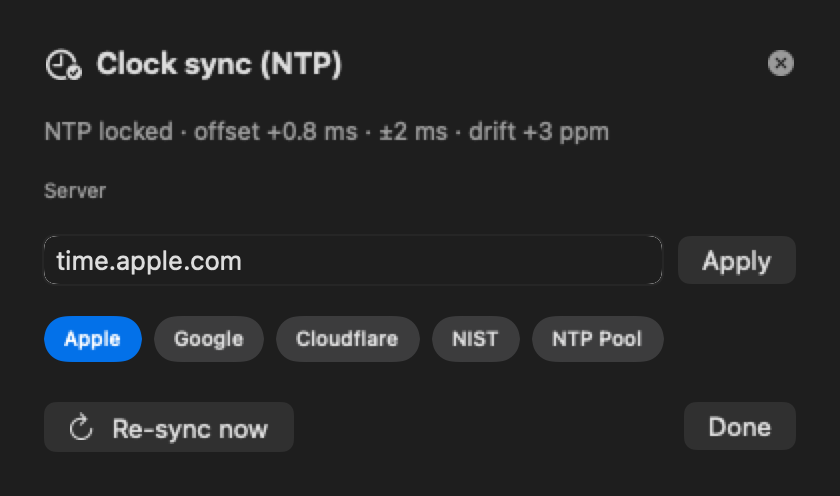
Cadence clock sync (NTP) settings showing a locked status
Clock sync settings. The locked status is staged for the screenshot; yours shows your live offset.
How it works

Locked in three steps.

  1. Pick a time server

    Use Apple (the default), Google, Cloudflare, NIST, the NTP Pool or your own server. Apply checks the server before switching.

  2. Cadence locks and keeps at it

    It takes a quick burst of samples, keeps the steadiest one, and checks again every 64 seconds all show long.

  3. Every output follows

    Displays, NDI®, SDI, web pages, the cloud and wall clocks all read the same disciplined time.

In the app

The real thing, not a mock-up.

Cadence itself, running a demo show. Clips are recorded in real time from Cadence's own renderer.

The real editor, live: tiles tick in real time and Keynote is paused and resumed. Timecode and the ProPresenter walk-in are simulated for the demo.
The actual output picture (what a display, NDI® or SDI receives): time of day and a running countdown, in real time.
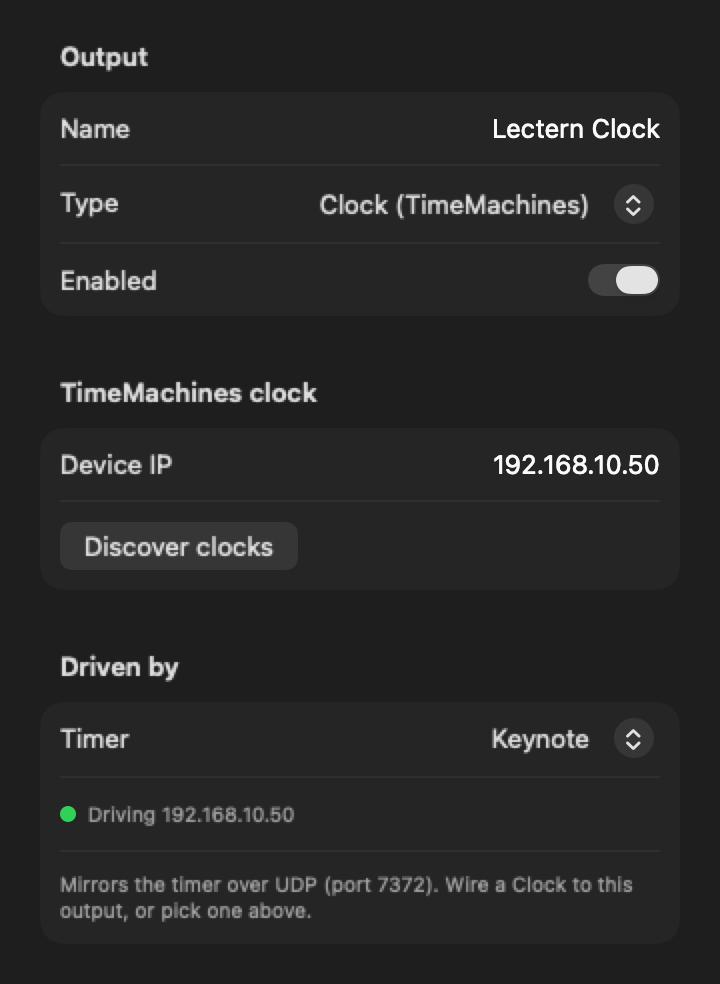
Cadence driving a TimeMachines wall clock from a timer
A TimeMachines clock driven by the Keynote timer. The address and status are staged.
Accuracy you can see

A broadcast clock is only as good as the time behind it.

Gentle corrections

Small errors (under 100 ms) are eased in at no more than half a millisecond per second, so a live countdown doesn't visibly jump. Bigger errors are corrected at once.

Learns your Mac's drift

Every Mac's clock runs a little fast or slow. Cadence measures that drift and corrects for it between syncs.

Leaves your Mac alone

Cadence corrects its own clock and never changes the Mac's system time.

Honest status

The status line shows NTP locked with the live offset, holdover on the last sync, or unreachable on the system clock. It never pretends to be locked.

TimeMachines wall clocks

Drive TimeMachines PoE, Wi-Fi and dot-matrix clocks from any Cadence timer. Find them on your network, and they follow every start and stop.

House timecode in

Decode LTC from any audio input, with the frame rate detected automatically, and drive a clock straight from the house timecode.

Video outputs (NDI, SDI) run at 59.94 fps. Web and cloud pages refresh 10 times a second, and TimeMachines clocks follow closely but not to the frame. Several Macs agree by locking to the same NTP server; they don't sync to each other. Timecode is LTC in only (no LTC out, MTC or PTP).

Questions

Good to know.

Do several Macs running Cadence stay in sync?

Yes, when they use the same NTP server: each one locks to it independently. They don't sync to each other.

Will a countdown jump when the clock corrects?

Not for normal corrections. Errors under 100 ms are eased in gradually. Only a large error, such as the first lock, is applied at once.

Does Cadence change my Mac's clock?

No. It keeps its own disciplined clock and leaves the system time alone.

What happens if the internet drops?

Cadence carries on in holdover from its last sync, and the status line says so. If it can't reach a server at all, it says so and uses the system clock.

Which wall clocks does it support?

TimeMachines PoE, Wi-Fi and dot-matrix clocks, over their own network protocol.

Does it do timecode?

It reads LTC from an audio input. It doesn't output LTC, MTC or PTP.

More from Cadence

One engine, every screen.

Put every screen on one clock.

The Cadence beta is free: every feature unlocked for 2 months, on up to 2 Macs.

macOS 15 Sequoia or later · Apple silicon or Intel · NDI built in · SDI needs a Blackmagic DeckLink card with Desktop Video